Selling price and MRP
The live price, the printed maximum retail price and the discount the platform is showing against it.

Swiggy Instamart price monitoring
Instamart serves each pincode from its own store, and the price a shopper sees belongs to that store. PriceIntel AI pins every read to the store serving the pincode you chose, compares the price with your MOP floor, and keeps a saved copy of the page as proof.
Selling priceAnd printed MRP
StockIn, out, not serviceable
PincodeUp to 10 per SKU
MOP floorBreach opened and closed
Why pincode-level
Instamart decides the store from the delivery location, and that store sets the selling price, the discount off MRP and whether the item is in stock. A read that is not pinned to a pincode reports whatever store the platform happened to pick, which is not what your shopper in that city sees.
Platform Intelligence sets the delivery location to each pincode you track before it reads the listing, then lays the pincodes out in one grid for the SKU, with red cells where the price is below your MOP and the lowest price per pincode marked green.
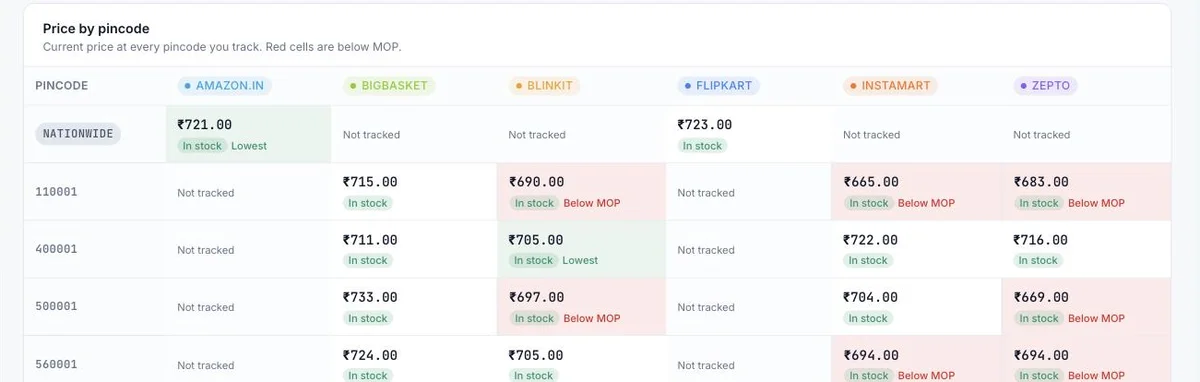
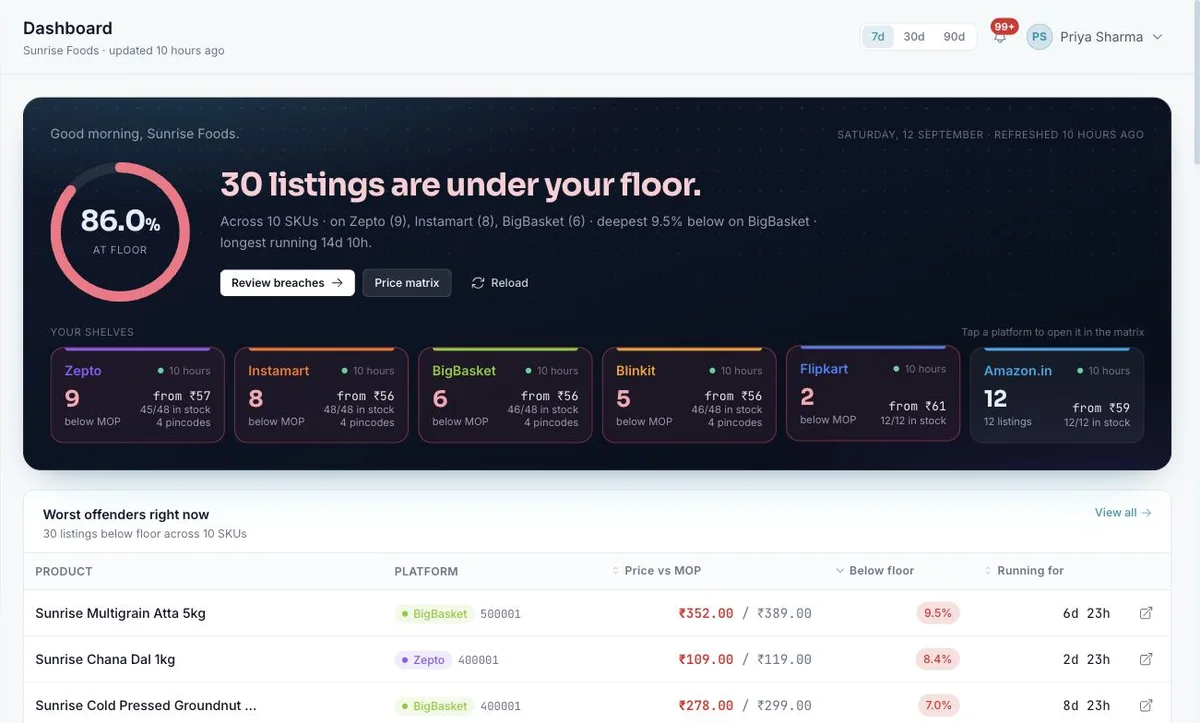
Screens from a demo account with a fictional brand. These are real product screens, not mock-ups.
What we read
The live price, the printed maximum retail price and the discount the platform is showing against it.
In stock, out of stock, or not serviceable when the store for that pincode does not deliver the item. Those are different signals and are kept apart.
Each read is compared with the MOP you set. Below the floor opens a violation; back above it closes one. The clock runs in between.
A saved copy of the exact page the price came from, linked from the listing, the violation and the export.
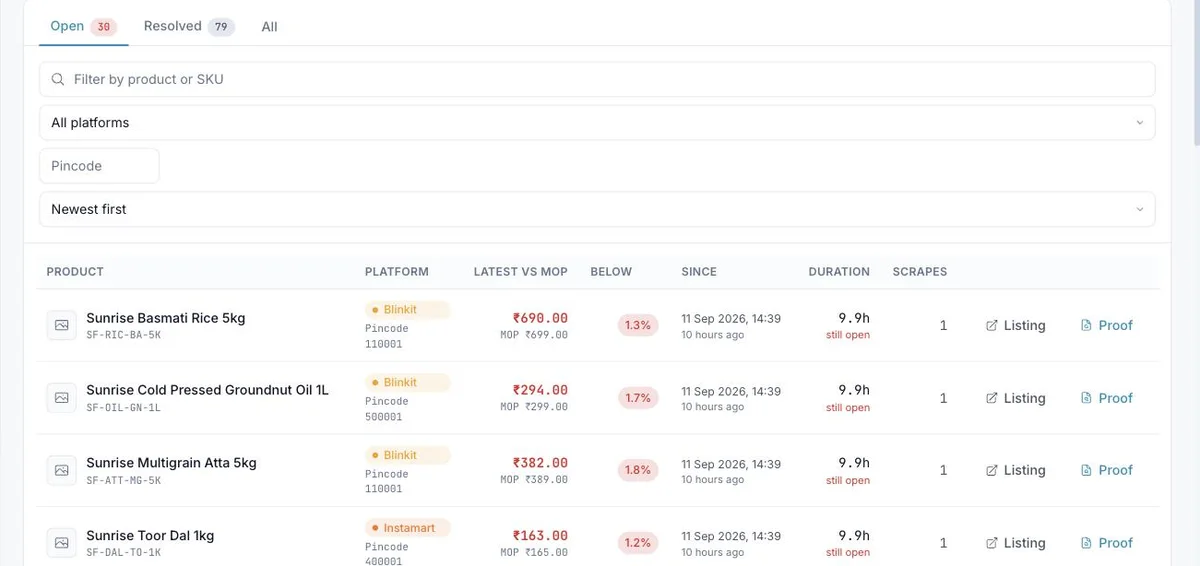
MOP violations on Swiggy Instamart
Each Instamart listing is compared with the floor you set for that SKU. The first read below it opens a violation with the price, the pincode and the time; the first read back at or above it closes the violation. The list keeps the clock running and names the repeat offenders, so the conversation with the platform starts from how deep and how long, not from a screenshot.
How it works
01
Paste the product link, type the pincodes to watch and set the floor. Or upload a CSV with one row per SKU; existing products are found by SKU and extended, never duplicated.
02
Typically twice a day, up to six times a day. Admins can refresh one product on demand. Scrape health shows the success rate of every pass against a 90% target.
03
One email per read, breaches first, with a spreadsheet attached. Or pull the data into Power BI with a read-only key, or receive signed webhooks.
Beyond Swiggy Instamart
Most brands track the same products on every platform they sell on, so the price matrix shows Swiggy Instamart next to the rest.
Zepto
Dark-store prices read per pincode, same floor, same clock, same proof.
Zepto price monitoringBlinkit
Dark-store prices read city by city, same floor, same clock, same proof.
Blinkit price monitoringAll six platforms
One price matrix across Zepto, Blinkit, Instamart, BigBasket, Amazon.in and Flipkart, with MOP violations and the digest across all of them.
Platform Intelligence overviewFAQ
See it with your SKUs
Send us ten SKUs and the pincodes you care about. We set them up and walk you through the first read.